Alpha Twin by AlephLamDigital twins for venues, factories and cities
Run your busiest day before it happens.
Alpha Twin turns a venue, a factory or a city into a live 3D copy your team can explore, rehearse and talk to, in a browser. Try a sell-out, a failure or a new layout on the copy first, and leave the real site alone.
Live 3D, running in your browserVoice-drivenEvery figure is simulated
Drag to look around
01 VisualiseVenue
Your site, drawn to dimension.
Harbour Arena, a 43,000-seat stadium with its own private 5G network, built in Genesis, AlephLam’s AI Native 3D Studio, to its real dimensions. Every stand, gate and radio is in its real place, and anyone on your team can open it in a browser, with nothing to install.
The full stadium twin opens on a laptop or tablet.
Harbour ArenaAs drawn
43,000SeatsModel
64RadiosModel
4GatesModel
02 ObserveVenue
Every number says where it came from.
A twin is only useful if people trust it. Each figure on the model carries its source and its age, so anyone can tell a live reading from a forecast at a glance.
Source labelsPreview on the model
03 SimulateVenue · What-if
Rehearse matchday before matchday.
Change one thing on a copy of the twin and compare it with the baseline. Here, half-time arrives and the crowd heads for the concourses. The real network is never touched.
Harbour ArenaBaseline
72%Network loadSimulated
1,240/minGate C entriesSimulated
64/64Radios onlineSimulated
04 Same platformFactory
The same twin, on a production line.
Plant 01 builds cars on a line of 24 stations. The roof lifts away to show the line, and every station reports its state. The same approach works for a warehouse, an AI data centre or a campus.
The full plant twin opens on a laptop or tablet.
Plant 01 · line 2Baseline
56JPHThroughputSimulated
24StationsModel
0bodiesQueueSimulated
05 AskFactory · Alpha Twin Voice
Talk to it. It acts.
Ask out loud and the twin gets to work: it runs the what-if, shows the result on the model and tells you how it got there, step by step. Always on a copy, never on your real site.
Alpha Twin Voice · Plant 01Scripted demo
Press to hear it answer
Ask me about line 2. Anything I run happens on a copy of the plant.
56JPHLine 2 this runSimulated
0bodiesQueue at station 16Simulated
A scripted demo: this page uses no microphone. In your twin you speak or type, and every action it takes is logged.
06 CitiesLondon · Westminster
The same twin, for a whole city.
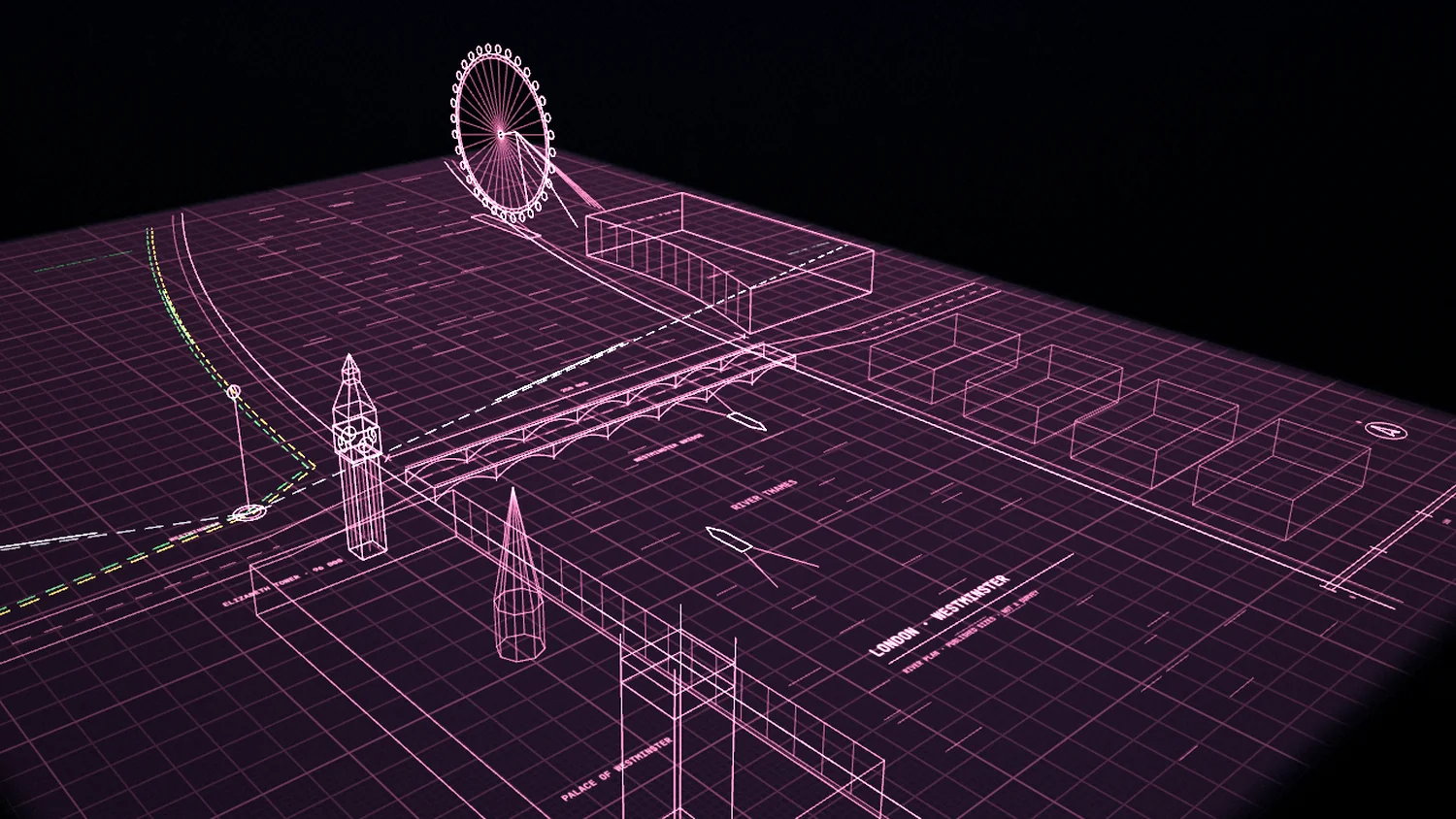
Digital London is our city twin: central London at true scale, following the real city’s transport, weather and tide, with a voice guide that plans a journey and draws it on the map. Here, one bend of the river at Westminster, drawn for this page.
Most digital twins are either a beautiful model or an operations dashboard. AlephLam’s are both. Genesis builds each site as cinematic, true-scale 3D; Alpha Twin runs the site inside it, with live status, simulation and a voice that operates it. One team makes both, so the 3D and the software are made for each other.
Every twin is built in Genesis: cinematic 3D at true scale.
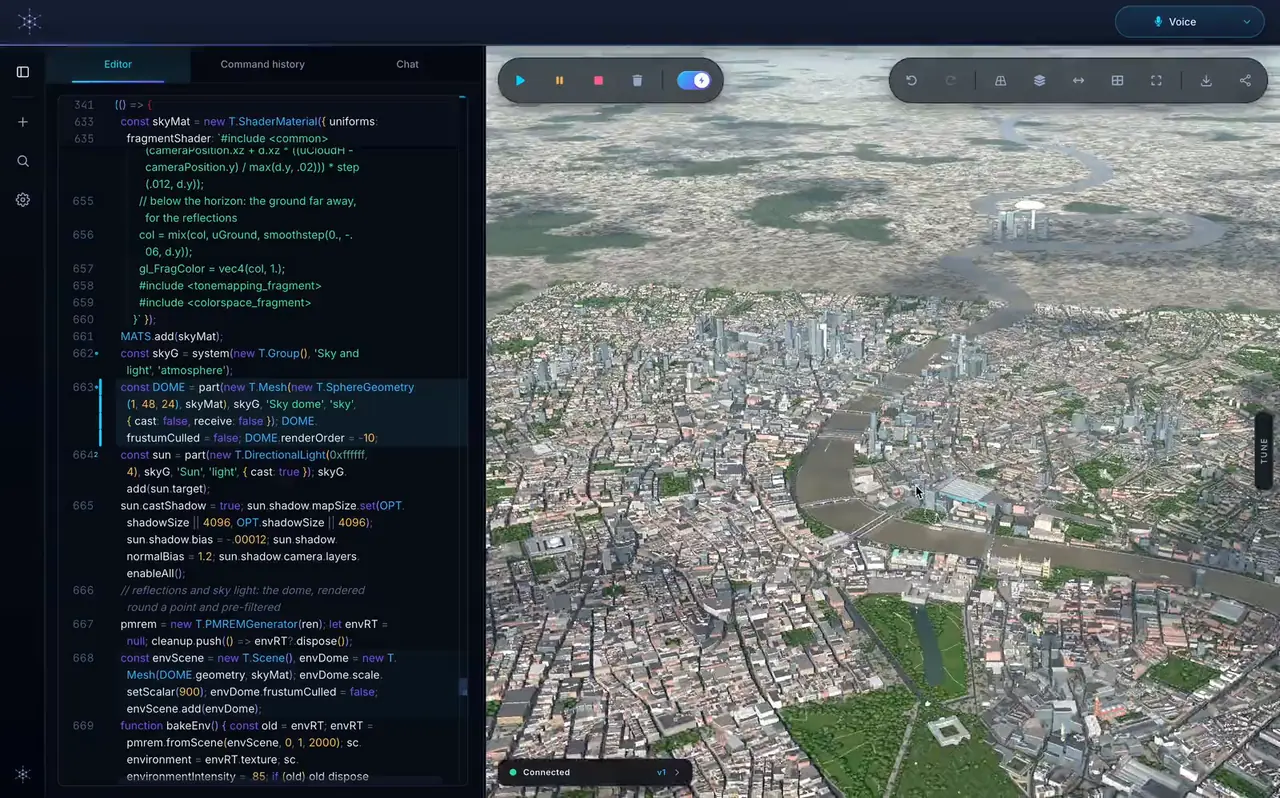
Genesis is AlephLam’s AI Native 3D Studio for real-time 3D. AI models draft complex scenes and simulations from a description, and our engineers shape every line in the studio’s own code editor. The result is exact, to dimension and built to be maintained: a stadium, a car plant, a city.
Genesis · the studio
Digital London in the studio: the code beside the city it builds, then the city in another of its drawing styles. Central London, at true scale.See Genesis
Real-time light and sky
True scale
Weather and age on every surface
Live drawing styles
Any browser, nothing to install
Harbour Arena, the full twin
160KB
43,000 seats, 64 radios, the crowd and the network model, compressed. Smaller than the picture of it further down this page.
Plant 01, the full twin
206KB
A 24-station line with its robots, conveyors and production model.
Digital London
10.3× 7.4 KM
Central London at true scale: the street network, the Thames, the parks and the landmarks.
To install
0
No plug-in, no app, no game engine. A link opens a twin.
AI drafts, engineers refine
Described, then perfected
Describe a site in words or by voice and AI models draft it as live 3D. Every line is open in the studio’s code editor, where it is set to the site’s real dimensions and behaviour. Every part is an object the twin knows about, so it can be tagged, queried and changed.
Simulations included
What moves is built there too
The simulation behind the picture, crowds, production lines and traffic, is built in the same studio, the same way. Alpha Twin runs it on a copy, in real time or faster.
Variations
Without starting again
Another layout, venue or market starts from code that already works, adapted with AI and by hand rather than rebuilt from nothing. That is how one platform serves a stadium, a plant and a city.
Cinematic, in real time
Light, sky and scale, live
Light and sky follow the hour and the season, haze and cloud shadows drift, and surfaces carry their age. Scenes are built as code, not loaded as heavy models, so a whole stadium opens in a browser tab and stays smooth on a slower device.
Alpha TwinThe operator software
The software your team runs the site with.
Around the 3D sits Alpha Twin’s operator application. It is the same for a stadium, a plant or a city: it reads from your systems, shows what is happening now and never sends a command back.
LiveHarbour Arena
Gate C1,240 / minMeasured · 5 s
East concourse82% fullMeasured · 4 s
North kioskNo readingStale · 6 min
Lifts12 / 12Measured · 10 s
Illustration
Live
What is happening now
Every asset’s state in one view, each reading with its source and its age. A stale reading is flagged, never shown as true.
IncidentOpen
Turnstile 4 offline
FailedTurnstile 4, Gate C
Depends on itEntry at Gate C: queue about 6 min
On the modelShown in place, with Gates B and D taking the overflow
Illustration
Incidents
From an alarm to its impact
An incident is drawn on the model: what failed, what depends on it and what it means for the day, with a replay the whole team can follow afterwards.
Assets and dataRead-only
Site fileMatched to the model
Ticketing feedConnected
1 gate counterSet aside: bad readings
Readings, last hour12,480
Illustration
Assets and data
Your systems, read-only
Site files, equipment lists and feeds are matched to their place in the model. A device that sends bad readings is set aside, and the twin keeps running.
Guided tours. Narrated walk-throughs of the twin, one for operators and one for decision makers.
Alpha Twin Voice. Ask out loud: it answers from the twin’s own data and operates the twin as it speaks.
What-ifs on a copy. Scenarios run beside the baseline and never touch the real site.
Where it fitsVenues, factories, cities and beyond
Built for sites where an hour matters.
A twin earns its keep where a bad hour costs money or puts people at risk. The platform is the same for each: a new market is a new scene, not a new product.
Venues
Stadiums, arenas, racecourses and event sites
Rehearse a sell-out, a cup tie or a concert, and see where the crowd and the network come under pressure.
Follow a fault from the radio or gate to the bars, tills and cameras that depend on it.
Test a new stand, fan zone or event layout on the copy before it is built.
Review an incident afterwards with a replay the whole team can follow.
Factories
Production lines, warehouses and data halls
Find the bottleneck before it costs a shift: stop a station on the copy and watch the queue form.
Try a changeover, a new layout or a new product on the copy first.
Train new staff on the twin without stopping the line.
Plan maintenance around what really depends on each machine.
From the drawings you already have to a copy that shows what is happening now.
1
Your drawings and data
We start from what you already have: layouts, CAD, equipment and tag lists, schedules and a few photographs.
2
Built in Genesis
In Genesis, our AI Native 3D Studio, AI models draft the site as live 3D and our engineers refine it in the code editor, part by part, to its real size. The twin stays light enough to open in a browser, phones included.
3
A model that runs
Behind the picture sits a model of what moves: people, products, power and network load. Every figure comes from it, in real time or many times faster.
4
Fed by the real one
When you are ready, the model takes its readings from your systems instead of simulating them, so the twin shows what is happening now.
Getting startedOne site first
Start with one site.
Each step builds on the one before, so you can stop at the one that pays for itself.
For bids and pre-sales
Sales visualiser
A branded twin of a proposed site, with scripted scenarios to show a client how it will work. It makes no claim of measured accuracy.
For handover and planning
Site twin
Your site as built, with real days replayed and an accuracy report that compares the twin with your own measurements.
For operations
Connected twin
The site twin on an approved, read-only feed from your systems, with alarms, history and Alpha Twin Voice.
Every figure on this page is simulated.
The stadium, the plant and the drawn London run on invented data: synthetic crowds, network load, production, trains and tide. They show what a twin can do. Yours would be drawn from your site and run on your own readings.
Read-only by design. A connected twin reads from your systems and never sends them commands.
Your data stays yours. It is used only to run your twin.
Honest labels. Measured, replayed, stale and simulated figures never look the same.
Book a demoVenues, factories and cities
Bring us a drawing.
Tell us what you run and the day you would most like to rehearse. We’ll come back to you with what a twin of it could do, and a time to walk you through these twins live.
 City twin